手把手教你玩转NanoBananaAI修图神器使用指南
Date: September 8, 2025 | Estimated Reading Time: 5 min | Author: YUAN

手把手教你玩转Nano Banana:AI修图神器使用指南
最近Google出了个叫Nano
Banana的AI修图神器,简直不要太厉害!它能帮你把照片修得跟专业摄影师拍的一样,还能让同一个人物在不同场景里保持一模一样。下面是收集到的比较推荐的提示词,主要是英文,大家也可以结合翻译工具换成中文。
一、这玩意儿到底牛在哪?
Nano Banana最厉害的就是两招:
- 1. 能反复修改 :你可以一直改一直改,直到满意为止
- 2. 认人特别准 :同一个人换100套衣服、换100个背景,脸还是那张脸
它能干这些事儿:
- • 把一个人P到不同场景里(比如今天在咖啡厅,明天在办公室)
- • 把两张图合成一张(比如把你的自拍P到巴黎铁塔前)
- • 给产品加特效(比如给你的手机加个酷炫的背景)
不过它也有点小毛病:
- • 精确裁剪不太行
- • 有时候光线处理得不太自然
二、实用口诀大放送
1. 做连环画必备口诀
想用同一个人做连环画?这么写指令:
一个单一的漫画书画格,采用粗犷的黑色电影艺术风格,高对比度的黑白墨线。在前景中,一位穿着风衣的侦探站在闪烁的街灯下,雨水浸湿了他的肩膀。背景中,一个荒凉酒吧的霓虹招牌倒映在水洼里。顶部有一个字幕框写着:「这座城市是个难以保守秘密的地方。」光线强烈,营造出戏剧性、阴郁的氛围。横向布局。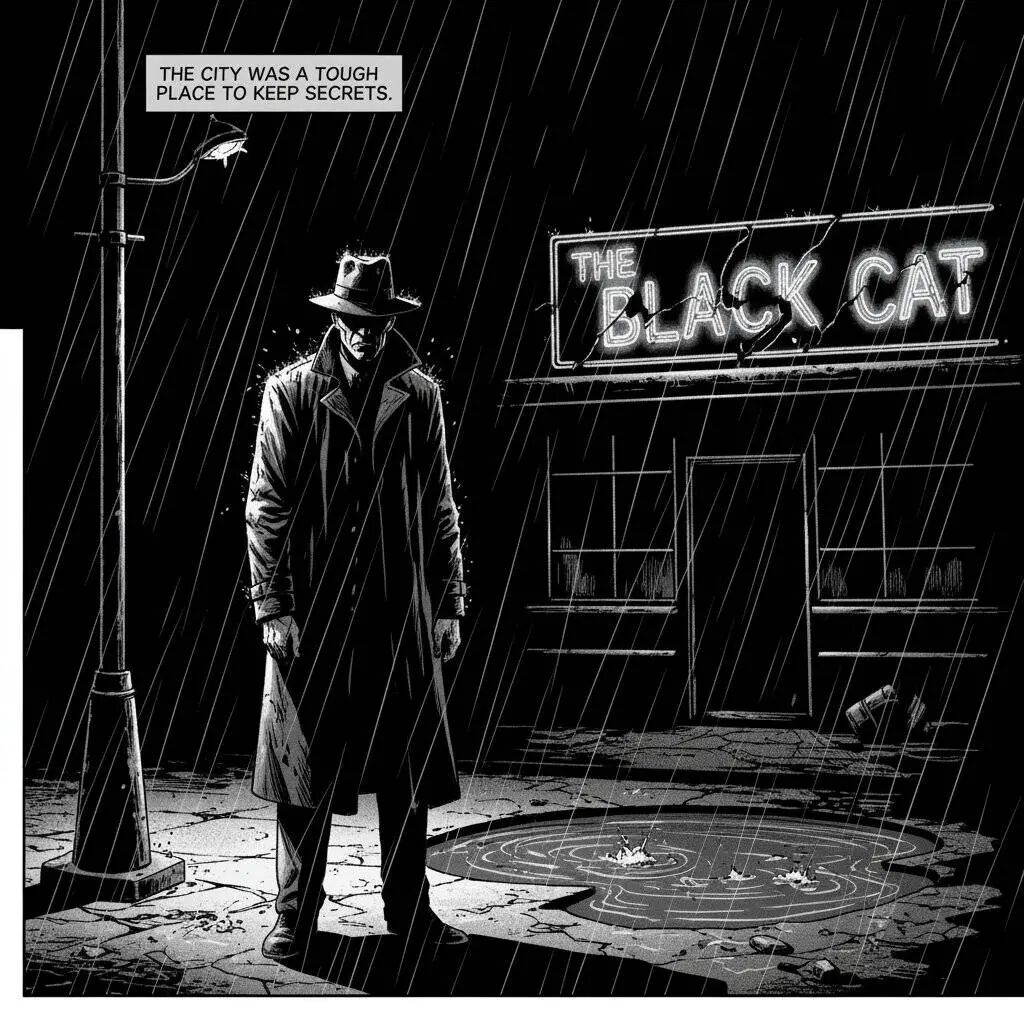
更多实用prompt:
- 1. Turn the uploaded portrait into a collectible character figure. Place a branded box behind it (box shows the character image), a computer screen on the side showing a Blender modeling viewport, and a round plastic base under the figure. PVC look, indoor studio, realistic lighting, film tone, keep face identity.
- 2. Keep the same character. Scene 1: subway platform, cool blue ambience, rim light from behind; camera at chest height, medium shot.
- 3. Same character, coffee shop close-up, shallow depth-of-field (bokeh), warm golden hour light, hands holding a paper cup with subtle steam, keep identity and hairstyle.
- 4. Same character, office night scene, glass reflections, city lights bokeh, three-point lighting, medium-wide.
- 5. Same character, warehouse with volumetric light rays through windows; dust motes, slightly desaturated cinematic look.
- 6. Storyboard 6 frames: hero intro, establishing shot, close-up on hands, over-the-shoulder UI shot, product hero, end card. Keep character identity across frames, consistent wardrobe.
- 7. Turn pose to a walking forward action, slight motion blur on legs, maintain facial details.
- 8. Same character in rainy street, wet asphalt reflections, neon signs; keep eye color and freckles.
- 9. Same character, studio packshot background in neutral gray; soft top light, fill card from camera left; expressions neutral.
- 10. Generate a shot list of 8 frames for an unboxing: box on table → hands open → figure removed → detail close-ups → turntable shot → closing hero. Keep product scale and branding.
2. 卖货必备口诀
想给你的商品拍”卖家秀”?试试这些:
一张高分辨率的、影棚照明的产品照片,展示了一个极简主义陶瓷咖啡杯,呈哑光黑色,放置在抛光混凝土表面上。光线设置是三点式柔光箱设置,旨在创造柔和的漫反射高光并消除刺眼的阴影。相机角度是略微抬高的 45 度拍摄,以展示其简洁的线条。超逼真,对从咖啡中升起的蒸汽有清晰的焦点。方形图像。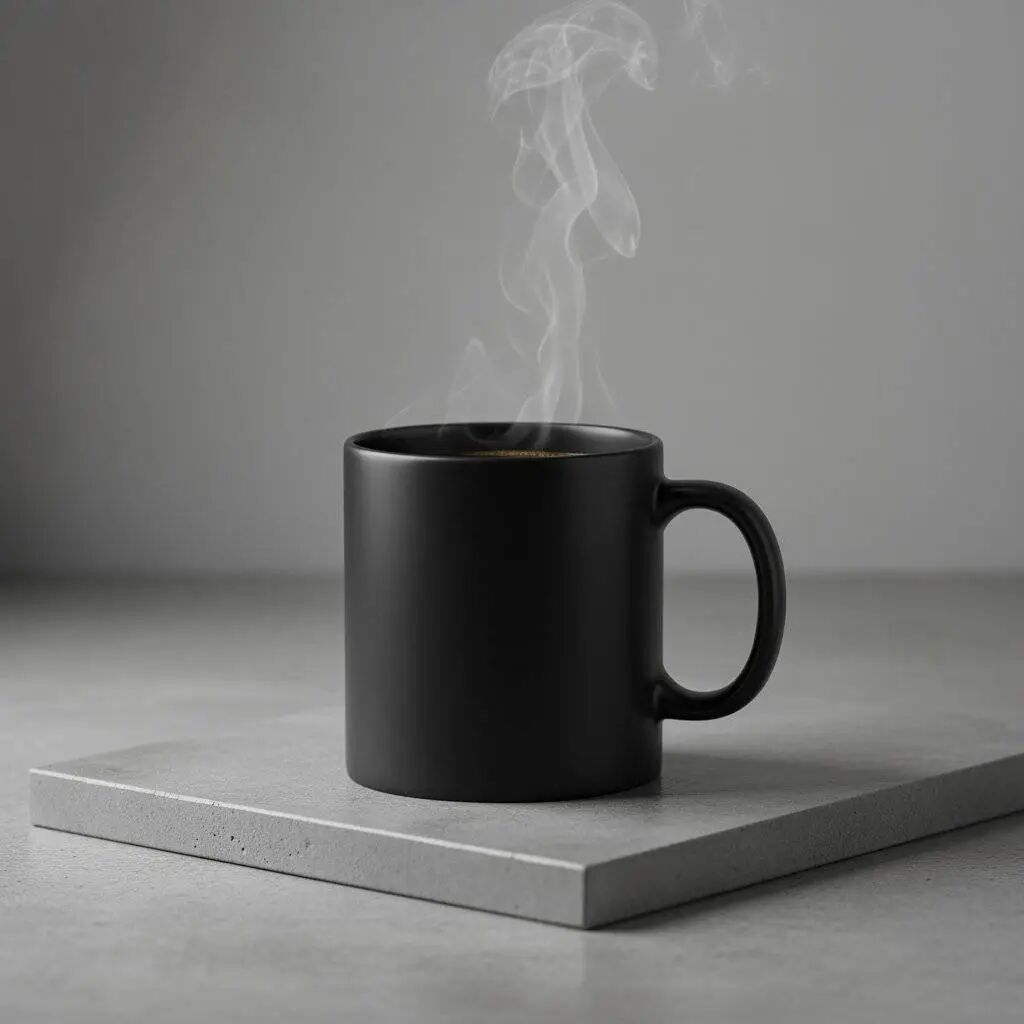
"把这个保温杯P到大理石台面上,要看到真实的倒影和影子,颜色调成冷白色。" 更多实用prompt:
- 1. Merge image1 (product) with image2 (modern kitchen). Place the product on a marble countertop, keep realistic reflections and shadows; color temperature ~5000K, slight vignette.
- 2. Cosmetics bottle on acrylic pedestal, seamless paper backdrop, softbox from right, subtle gradient background, specular highlights controlled.
- 3. Sneakers on concrete block, low-angle hero shot, studio rim light, faint haze for depth.
- 4. Smartphone floating exploded view: separated layers for screen, mid-frame, camera module; dark studio, glossy reflections managed.
- 5. Watch macro shot, 90° top-down, soft diffused light, brushed metal texture visible, anti-alias text on dial.
- 6. A/B variants: same layout, change only background material (wood / stainless / terrazzo), keep product color constant.
- 7. Lifestyle placement: living room sofa, daylight from window camera left, product on side-table; white balance matched to scene.
- 8. Promo trio: front / 45° / top angles in one session; consistent brand palette and shadows.
3. 换装自拍口诀
想试试不同造型?这么玩:
更多实用prompt:
- 1. Keep face identity; change hairstyle to retro bob, add thin eyeliner, soft skin retouch while preserving pores, realistic hair strand flyaways.
- 2. Outfit swap to streetwear (oversized hoodie + cargo pants), neutral studio background, soft Rembrandt pattern lighting.
- 3. Add sunglasses with subtle reflections, ensure eyes still faintly visible through lens tint.
- 4. Formal portrait, key light 45°, fill −1EV, background seamless #EAEAEA , color-accurate skin tone.
- 5. Outdoor candid, overcast sky as giant softbox, slight film grain, maintain freckles and moles.
- 6. Headshot for ID: straight-on camera, no smiles, flat even light, neutral background, maintain exact facial geometry.
三、六大常用场景模板
1. 拍得像真的一样的照片
"拍一张程序员在共享办公室debug的中景照片。用柔和的LED灯,营造专注又放松的氛围。用佳能EOS R5拍,要能看清屏幕上的代码和键盘纹理。16:9比例。"2. 可爱贴纸
"画一个卡哇伊风格的树懒贴纸,挂在树枝上,大眼睛闪闪发亮,面带微笑。线条要粗犷清晰,上色要简单,用马卡龙色系。背景必须是纯白的。"3. 带字的logo
"设计一个复古风格的精酿啤酒logo,叫'Hoppy Trails',字体要手写感衬线体。加上山的剪影和啤酒花藤蔓,用绿色和棕色搭配。"4. 商品展示
"拍一张哑光黑无线耳机盒的高清产品图,放在拉丝铝板上。用三点柔光箱打光,突出质感减少反光。45度角拍摄,展示人体工学设计。要超真实,特别对焦在开盖机构上。方形图。"5. 极简风格
"拍一个极简构图:一个白瓷花瓶放在画面左下角。背景是浅灰色的大片留白,方便加文字。光线从上往下柔和打下来。4:5比例。"6. 讲故事的照片
"画一个赛博朋克风格的漫画格:前景是黑客在霓虹灯小巷里快速敲击全息键盘,背景是高楼大厦和发光广告牌。加个文字框写'今晚着火的不仅是防火墙'。用高对比灯光营造紧张的高科技感。横版图。"四、修图三步法
官方说最好分三步修图,每次只改一两个地方:
第一步:先搞个大概
"把这张头像P到阳光咖啡馆露台上,要暖黄色光,背景虚化,像电影画面。"第二步:加点细节
"人不能变样。加个笔记本电脑显示代码界面,再加个冒热气的咖啡杯,色调调冷一点。"第三步:精修
"构图收紧到半身,眼睛加点亮光,加点轻微胶片颗粒感。"拍产品也分三步:
- 1. 先拍正面
- 2. 再拍45度角
- 3. 最后拍俯视图
然后拼在一起就是个专业的产品展示了。
五、去哪玩这个神器?
- 1. 官方入口 :Google AI Studio (网址ai.studio/banana),最全功能但可能要魔法
- 2. 其他网站 :
- • Openrouter:效果接近官方,速度很快
- • Lmarena:不用注册就能用
- • Adobe Firefly:适合设计师
- • Chatbox:需要自己设置一下
选网站要看:
- • 速度快不快
- • 能不能下高清原图
- • 能不能一次生成多张
- • 收不收费
- • 有没有水印
六、老司机的小技巧
- 1. 多说人话 :别光写关键词,用完整的句子描述你想要啥
- 2. 注意光线 :换背景时要让新场景的光线和原来照片匹配
- 3. 说清材质 :想要金属感就说”要像拉丝不锈钢那样”
- 4. 避开短板 :这工具裁剪不太行,最好一开始就说清楚要啥构图
- 5. 多学经验 :去Reddit看看别人是怎么玩的,能学到不少技巧
最后唠叨
Nano Banana这玩意儿真的改变了修图游戏规则,不管你是想晒自拍、卖货、还是搞创作,它都能帮上大忙。记住多试几次,熟能生巧!
想学更多可以去:
- • Google官方博客
- • Google开发者文档
- • AI Studio里的例子
- • 科技媒体的测评文章
现在AI修图这么厉害,不学就out啦!赶紧试试吧,保证你会爱上这个神器!
以上就是今天分享的内容啦,觉得我的文章有用,记得一键三连,点个 关注、分享、喜欢 。我建了一个 AI 副业公益群,每天都会分享一些 Al 的最新流量玩法和案例拆解,下方扫码备注“ AI ”拉你入群。